How to Create a WordPress site: A Comprehensive Guide for Beginners (2025)

No More Struggles With Website Building
Most beginners believe that for building a WordPress website, they will require technical skills. Actually, all it requires is the proper roadmap and some necessary plugins. With these, you can make a WordPress website that’s both beautiful and completely functional without having to spend weeks on learning to code.
In this complete step-by-step beginner’s guide, we’ll take you through everything: from planning your site and configuring hosting, to installing WordPress, customizing with themes and plugins, SEO-optimization, and finally launching your site.
By the time you’ve reached the end, you’ll have all the information you need to build your own website on WordPress confidently.
Why Choose WordPress?
WordPress is the first choice for millions of websites as it balances between power and access.
Whether you are starting a personal blog or an industrial-power business site, WordPress provides equipment and flexibility to create some professionals without the need for comprehensive technical knowledge.
Beyond use, WordPress benefits from a massive ecosystem and an active community. That means constant improvements, extensive documentation, and lots of themes, plugins, and tutorials to help you solve nearly any web problem in no time.
Key Reasons to Choose WordPress
Are you ready to build? Let’s start with step by step
Planning Your Website
Each successful project begins with a solid plan, and your website is no exception. Jumping directly into the design without proper planning often leads to time, confusion, and results that do not match your goals.
Taking time to plan is ensured that your site has a clear direction from day to day.
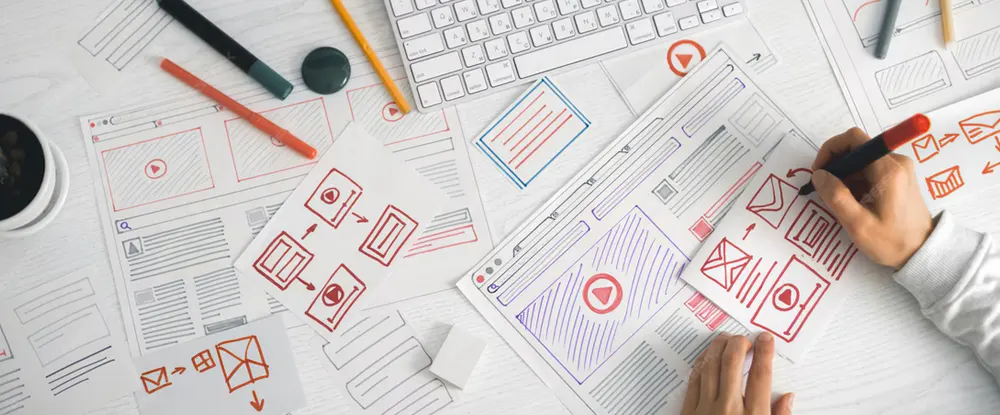
The plan also helps you think strategically about the purpose, audience and structure of your website. By defining these elements quickly, you will take smart decisions later when selecting themes, plugins and materials.
In short, a good plan lays the foundation for a website that not only looks great, but also results.
Major reasons for choosing WordPress
Key Reasons to Choose WordPress
Identify Your Target Audience
Create a Sitemap
Initially a small plan saves the hours of the rework later, making you a clear vision and a smooth path because you move towards creating your website.
Choosing Hosting & Domain
Before your website may be live, you will need two major things: a domain name and a hosting provider.
The domain acts as the address of your site on the Internet, while the hosting is the place where your website files are stored and distributed to visitors.
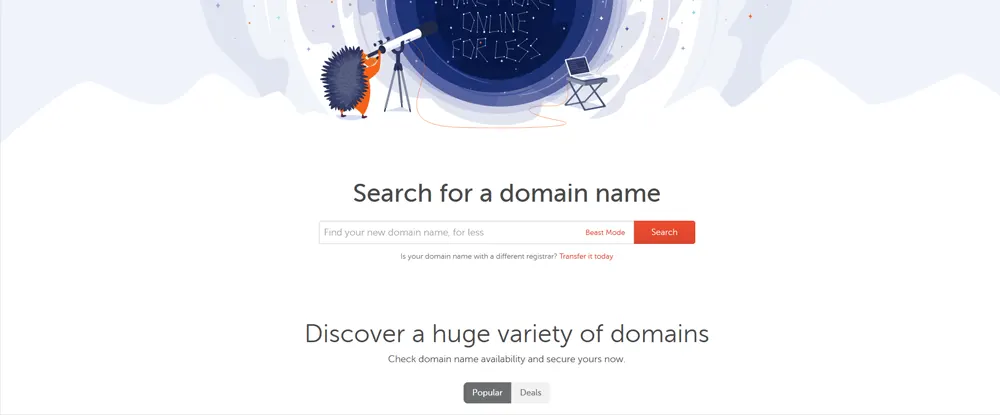
It is important to choose the right domain and hosting as they directly affect your site's access, speed and reliability.
A well -chosen domain makes your brand memorable, while reliable hosting ensures that your site runs smoothly, quickly loaded, and remains safe.
Choosing a domain name
Selecting Web Hosting
Popular hosting provider
Most hosting provider lets you register your domain name in checkouts - often with a free first year. It makes the setup faster and keeps everything under one account.
Choosing a strong domain name combined with reliable hosting sets the platform for the success of your website, giving you a solid basis before you start designing.
WordPress installing
Now that your hosting and domains are ready, the next step is to install WordPress.
This is the platform that provides strength to your website, publishing the content, customizing the design and managing everything from a dashboard.
The best thing is that it is easy to install WordPress. Most hosting providers provide quick installation equipment, but you also have the option to install it manually when needed.
Once established, you will have the foundation for creating a professional website.
How to Install WordPress
Start WordPress setup
Once the WordPress is established, the next stage is to configure some basic settings.
These small adjustments may look simple, but they have a major impact of how your website looks, acts, and performs.
Leaving this stage often causes confusion later, so it is best to set everything properly from the beginning.
By customizing normal settings, configuring SEO-friendly URL, and cleaning unnecessary default materials, you make a strong base for your site.
These twice ensure that your website is more professional, user friendly and ready for future optimization.
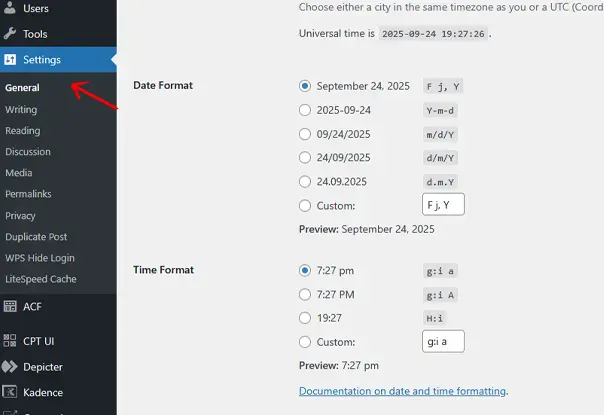
Adjust General Settings
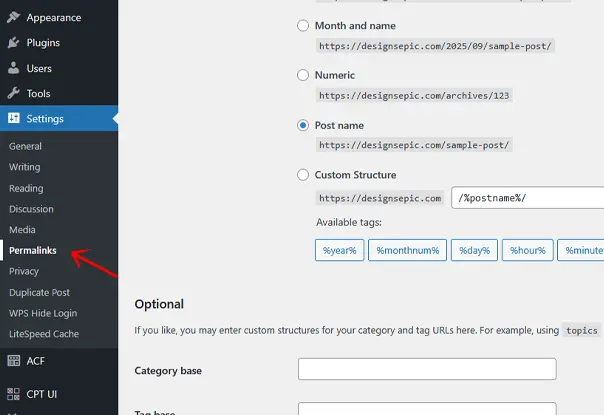
Configure Permalinks
Clean Up Defaults
Choosing & Installing a Theme
A WordPress theme determines the overall design, style and layout of your site.
From colors and fonts to page structures and navigation menu, the theme defines how your website looks feel it.
Choosing the right subject quickly saves you time and helps you create a site that feels professional and user friendly
Not all WordPress themes are made equal, and the choice between free and premium themes can greatly affect the flexibility of your website.
Free themes are great for simple projects, but premium themes usually come up with advanced options, better support and more design options.
Choosing a theme that aligns with the purpose of your website requires detailed research.
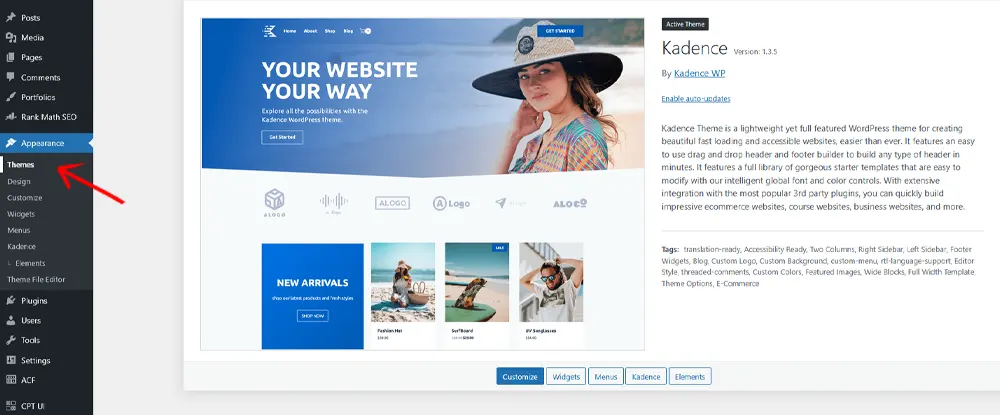
Free vs. Premium Themes
Popular Beginner-Friendly Themes
how to install wordpress theme
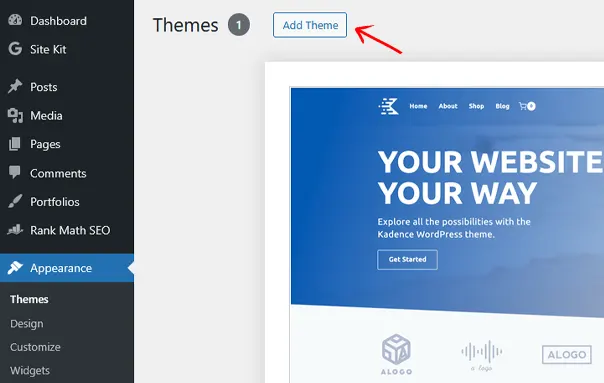
More About Themes?:
Installing Essential Plugins
One of the biggest benefits of WordPress is its flexibility through plugins. Think of plugins as apps for your website, they add features and functionality without the need to write any code.
From SEO to protection, plugins help you customize your site to meet your accurate needs.
However, with thousands of plugins being available, it is important to focus on the necessary. Establishing a lot can slow down your site, while choosing wrong people can cause compatibility problems.
Starting with a handful of plugins, you will give your website a strong base for display, safety and development.
Must-Have WordPress Plugins
how to install wordpress plugin
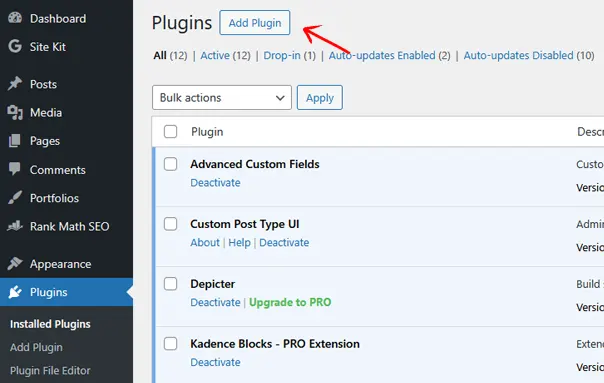
More About Plugins?:
Creating Website Pages
Once, theme and plugins are set, the next step is to build the main pages that will create the foundation of your website.
These pages give a site structure, provide the necessary information, and guide the visitors to the tasks you want. Without them, your site may feel incomplete or navigate.
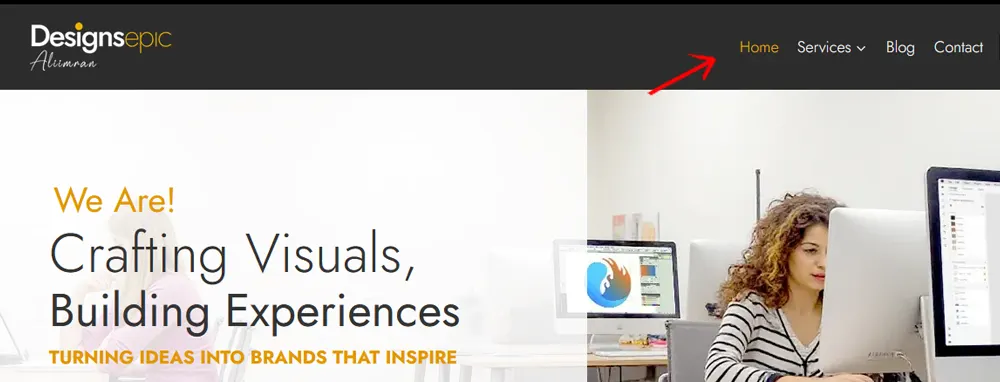
Each page provides a unique purpose, some is designed to show your business, while others help to create confidence or meet legal requirements.
By creating these essential pages quickly, you establish reliability and ensure that visitors can find everything required in a few clicks.
Main Website Pages
To create these pages, go to pages → Add new to your WordPress dashboard and start making them
Customizing Menus & Navigation
Menus are one of the most important elements of your website. They act like a roadmap, guiding visitors to the information they’re looking for quickly and efficiently.
A well-designed menu improves user experience and makes your site feel professional.
Good navigation is more than just adding links—it’s about structure and clarity. Visitors should be able to understand your site’s layout at a glance, without feeling overwhelmed by too many options.
When your menus are intuitive, people are more likely to stay longer and explore more of your content. Customizing your menus also gives you control over what pages, categories, or links deserve priority.
By highlighting the most important areas of your site, you ensure visitors don’t miss key content such as your services, blog, or contact page.
Navigation Tips
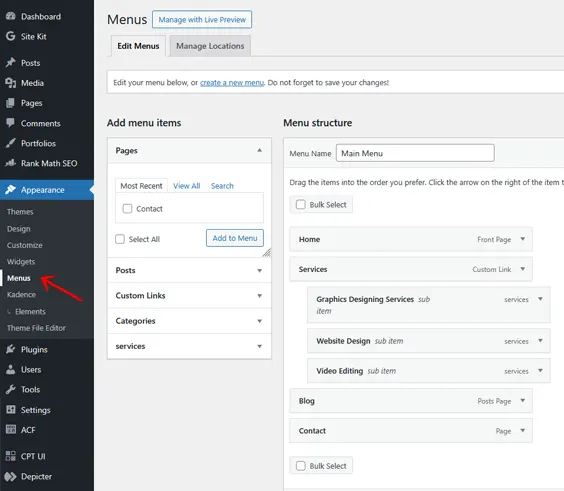
A clear, simple menu not only makes your website easy to navigate but also leaves a strong impression of professionalism and trustworthiness.
Adding Content
Content is the heart of every website. Without valuable, engaging, and well-structured content, even the most visually stunning site will struggle to hold visitors’ attention.
Quality content is what informs, educates, entertains, and ultimately persuades your audience to take action. When you add content, think of your website as more than just a digital space—it’s your platform to connect with people.
Whether through blog posts, service pages, or product descriptions, your words and visuals tell your story and showcase what makes you unique.
Adding the right content also plays a big role in SEO. Search engines rank websites not just by technical performance but by the value of their content.
Well-optimized blog posts, clear page copy, and organized categories can improve visibility while providing a better experience for your visitors.
Content Tips for Your Website
Blog Posts
Pages
Organize with Categories and Tags
Categories group your posts into broader topics, while tags highlight specific details. Together, they make your blog more user-friendly and easier to navigate.
Optimizing for Performance
Website performance plays a critical role in how users interact with your site. A slow-loading website can frustrate visitors, causing them to leave before even exploring your content.
Speed matters not just for your audience but also for search engines, which favor fast, responsive websites in their rankings. Optimizing performance is about striking the right balance between design, functionality, and speed.
You don’t need to sacrifice visual appeal to achieve faster load times—simple tweaks and smart tools can dramatically improve your site’s performance without compromising quality.
A well-optimized site creates a seamless experience for visitors, whether they’re browsing on desktop or mobile.
By investing a little effort into performance improvements, you can increase user satisfaction, boost conversions, and give your website a competitive edge in search engine results.
Practical Performance Tips
SEO Optimization
Building a beautiful website is only the first step. To attract visitors and grow your audience, your site needs to be visible on search engines like Google.
This is where SEO (Search Engine Optimization) comes into play—it helps your content get discovered by the right people. SEO ensures that your website doesn’t just exist online but also stands out among millions of competitors.
By optimizing your pages for search engines, you increase the chances of ranking higher in search results, which translates into more traffic, leads, and potential customers.
The good news is that SEO doesn’t need to be overly technical. With the right tools and strategies, you can optimize your site effectively—even as a beginner.
Let’s look at some practical steps you can take to boost your website’s visibility and performance.
Practical SEO Steps
More About SEO Plugins?:
Security & Backup
Securing your website is just as important as building it. Without proper protection, your site could fall victim to hackers, malware, or data loss.
Setting up security and backups from the start ensures peace of mind and protects all your hard work.
Key Security & Backup Measures
With proper security and regular backups, your WordPress website stays safe, recoverable, and reliable—giving you confidence to grow without worry.
Testing Your Website
Before launching, it’s important to test your website thoroughly. A site that looks good but doesn’t function properly can frustrate visitors and hurt your credibility.
Testing ensures everything works as expected and delivers a smooth user experience.
Key Areas to Test
Thorough testing gives you confidence that your site is polished, professional, and ready for visitors from day one.
Launching Your Website
The final step is often the most exciting—taking your website live! After all your planning, designing, and testing, it’s time to share your work with the world. A well-executed launch helps create buzz and draws your first wave of visitors.
Key Launch Actions
Launching your site is just the beginning—treat it as the foundation for growth, updates, and ongoing improvements that will keep visitors coming back.
Ongoing Maintenance
Building your WordPress website is just the beginning—keeping it healthy and secure requires ongoing care. Regular maintenance ensures your site continues to run smoothly, stays protected from threats, and provides the best experience for your visitors.
Key Maintenance Tasks
With consistent maintenance, your website stays secure, optimized, and ready to grow—ensuring long-term success for your online presence.
Frequently Asked Questions (FAQ)
how to create a WordPress site
If you’ve been wondering how to create a WordPress site, this Guide for Beginners is the perfect place to start. From choosing reliable hosting to selecting the right themes, we cover every essential step. Plus, our FAQ section addresses the most common questions—so you can build your website with confidence and ease.
Q1. Do I need coding knowledge to build a WordPress website?
No, you don’t need coding skills to build a website on WordPress. The platform is beginner-friendly and offers themes, plugins, and drag-and-drop page builders like Elementor or Kadence Blocks that make designing your site simple and visual.
Q2. How much does it cost to build a WordPress website?
WordPress itself is free, but you’ll need to pay for web hosting (starting from as low as $3–$10 per month) and a domain name (around $10–$15 per year). Optional costs include premium themes, plugins, or professional services if you want advanced features.
Q3. Which is better for beginners: free or premium themes?
Free themes are great for simple websites and for learning the basics. However, premium themes offer more customization, advanced features, and dedicated support. If you’re building a business or eCommerce website, investing in a premium theme can be worthwhile.
Q4. What are the must-have plugins for a new WordPress website?
Some essential plugins include:
Rank Math or Yoast SEO (SEO optimization)
Wordfence (security)
UpdraftPlus (backups)
WP Rocket or W3 Total Cache (speed optimization)
WPForms (contact forms)
Q5. Is WordPress good for SEO?
Yes, WordPress is SEO-friendly right out of the box. With the help of plugins like Rank Math or Yoast SEO, you can easily optimize your pages, add meta descriptions, and structure your site to rank higher on Google.
Q6. How do I choose a good hosting provider for WordPress?
Look for hosting that offers speed, uptime reliability, security, and beginner-friendly tools. Popular options include Bluehost, SiteGround, Hostinger, and WP Engine. Managed WordPress hosting is the easiest option for beginners who want hassle-free setup and maintenance.
Q7. How long does it take to build a WordPress website?
If you follow the step-by-step process, you can get a simple WordPress website up and running in just a few hours. More complex websites with custom features, content, and design may take a few days or weeks.
Q8. How do I keep my WordPress website secure?
To secure your site, always:
Install SSL (most hosts offer it for free).
Use strong passwords and enable two-factor authentication (2FA).
Regularly update WordPress, themes, and plugins.
Use a security plugin like Wordfence.
Schedule automatic backups with UpdraftPlus.
Final Thoughts: how to create a WordPress site
Building a WordPress website may seem overwhelming at first, but once you break it down into steps, it’s entirely manageable—even for beginners.
With the right planning, hosting, theme, plugins, and SEO strategy, you can create a beautiful and professional site that grows with your goals.
Remember: