
How to Do Website Design? A Beginner’s Guide

Why are websites important for businesses and Professionals?
Websites are an important tool for introducing a product or service to a mass audience online. It’s nearly impossible to reach a globally diverse customer base physically or through any other channel. Websites are the fastest and most convenient way to share information and communicate messages.
Different types of websites serve different purposes depending upon specific goals and objectives. It can be a personal portfolio, an e-commerce store, a blog, or a business website; the main purpose is to connect with the global audience and deliver information.
Today’s world is connected with the internet and accessible to everyone through smart communication devices. For this, businesses and individual professionals should have their own website and establish their online presence.
Almost everyone is familiar with and surfs websites, but when it comes to developing a website, it sounds a bit overwhelming. The general perception about website development is that it requires extensive coding knowledge and design skills.
The good news is that there are some alternative methods and modern tools available, making this complex task quick and simple, particularly for beginners. However, to be a professional developer, it is advisable to acquire in-depth knowledge of web languages and extensive design skills.
Here I’ve decided to write this basic guide to provide essential information about website development tools and techniques, as well as get familiar with basic website terminology. I hope it’ll help you through your own website design and development process.
Decide Required Website Type
Websites come in different types, designs, and functionalities, depending on their purpose and objectives. For instance, an individual professional might want a portfolio website to showcase their work. A manufacturer or distributor might need an e-commerce store to sell their product online.
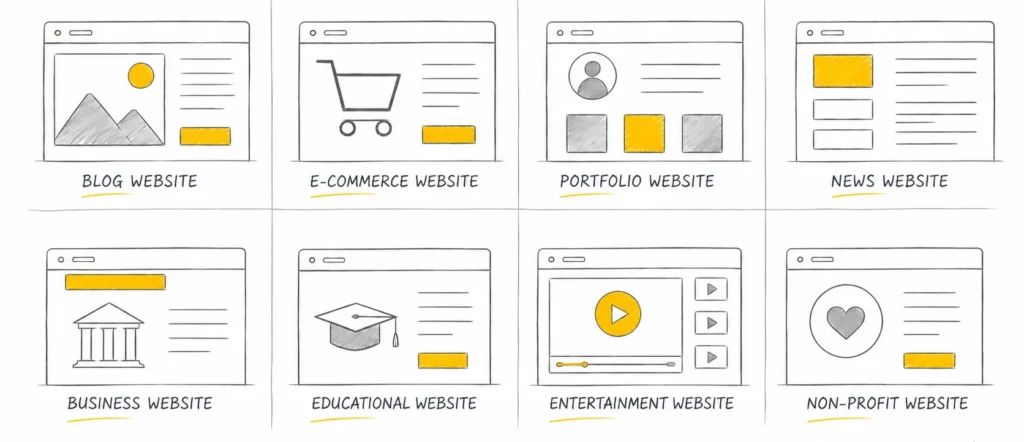
So, the starting point is to decide what type of website is perfect for a particular purpose. Let’s list some website types and who it is best for:
Website type affects every aspect of a website, including its structure, layout, color branding, features, and functionality, so an expert designer considers this aspect keenly and plans website design accordingly.
Website Structure and Site Map
Website structure is about dividing website content into different sections and pages and how these pages are organized.
Regardless of website types, the basic structure of all websites is almost identical. However, some additional features and functionalities associate them with a different type. For example, an e-commerce website has a shopping cart system, while a community website might have an online chat application installed.
Generally, a website has the following basic pages:
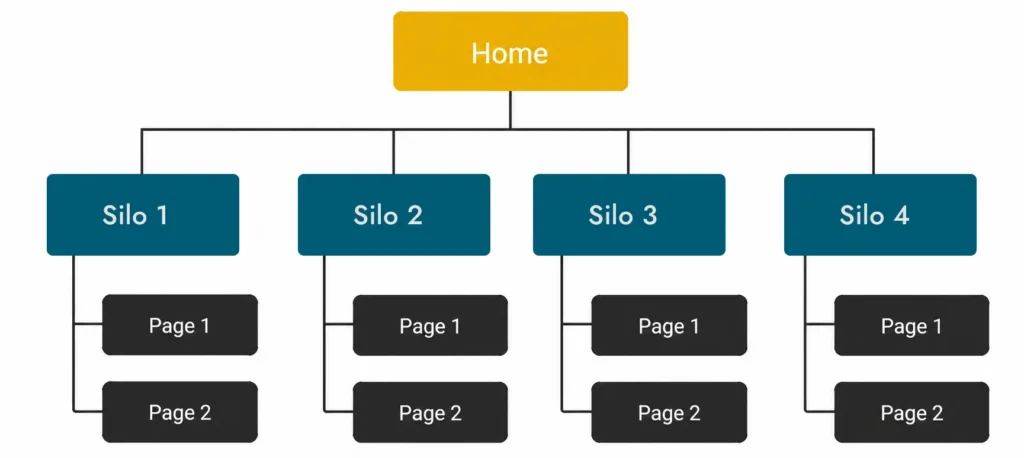
A clear site map of a website should be prepared to show how different pages will be organized and internally linked. A website with proper content distribution and a clear navigation plan makes it easy for visitors to navigate through different pages and access website content without hassle.
Select Development Environment and Tools
A development environment is a workspace with all necessary tools and technologies required for a particular type of website. A designer has to decide which platform provides the best options and tools to achieve specific website features and functionality.
Technically, websites are written with web languages, and extensive knowledge and skill with coding is required for website development, which is a bit complex and time-taking to be an expert.
Fortunately, many alternative platform and tools makes this process a lot easier and faster, even for non-developers. Beginners can choose from these pre-coded frameworks and avoid coding and programming.
Some of them are listed under:




These applications come with a pre-coded basic website structure and offer a graphical user interface, where users can build websites by dragging and dropping elements and widgets.
These applications are also loaded with modern development tools, including content editors, theme designe, image optimization, SEO tools, and many other essential tools for website development.
Searching For Domain Name
A domain name is a short address to browse a website on the internet. It is a unique address and needs to be registered by some domain registration services or a web hosting company.
While deciding on a domain name for a website, the following things should be considered:
All page URLs and slugs of a website are based on the main domain name, so it should be selected thoughtfully.
Use Branding Color Palette
As a common practice, a website color scheme should be in accordance with brand identity design. Website look and feel depends on the selection and proper arrangement of the color palette. So while selecting a color scheme for a website, the following important points should be kept in mind.
Color selection for a website is an important task for a website designer. The wrong selection or arrangement of the color palette may create many visual and accessibility issues, so this task should be done thoughtfully.
Website Typography
A major portion of websites consists of its text-based content, which makes proper use of typography extremely important. There are some set standards and rules for website typography for better readability and performance.
Websites use web-optimized fonts that are lightweight and easily accessible. Several online font services provide fonts for websites, such as Google Fonts and Adobe Fonts.
Some basic points should be followed while selecting a typeface for a website:
A website’s text content is structured with the help of HTML tags. These tags decide the size and type of text. The following are some recommended font sizes for different HTML headings and paragraphs.
HTML Tag | Use | Recommended Size |
(p) Paragraph | Main Contents | 12 pt |
(h1) First-level Heading | Page Heading | 24-32 pt |
(h2) Second-level heading | Section Heading | 20-24 pt |
(h3) Third-level heading | Sub-heading | 16-20 pt |
(h4) Fourth-level heading | Minor Heading | 14-16 pt |
(h5) Fifth-level heading | Small Heading | 12-14 pt |
(h6) Sixth-level heading | Smallest Heading | 11-12 pt |
Page Layout Design
Website pages are divided into various sections to organize content and elements, which refers to page layout. Generally, websites have a standard layout so it’s convenient for visitors to find required information where they expect it. An uncommon website layout may be inconvenient for visitors to navigate through different pages or find desired information.
A common page layout consists of the following sections:
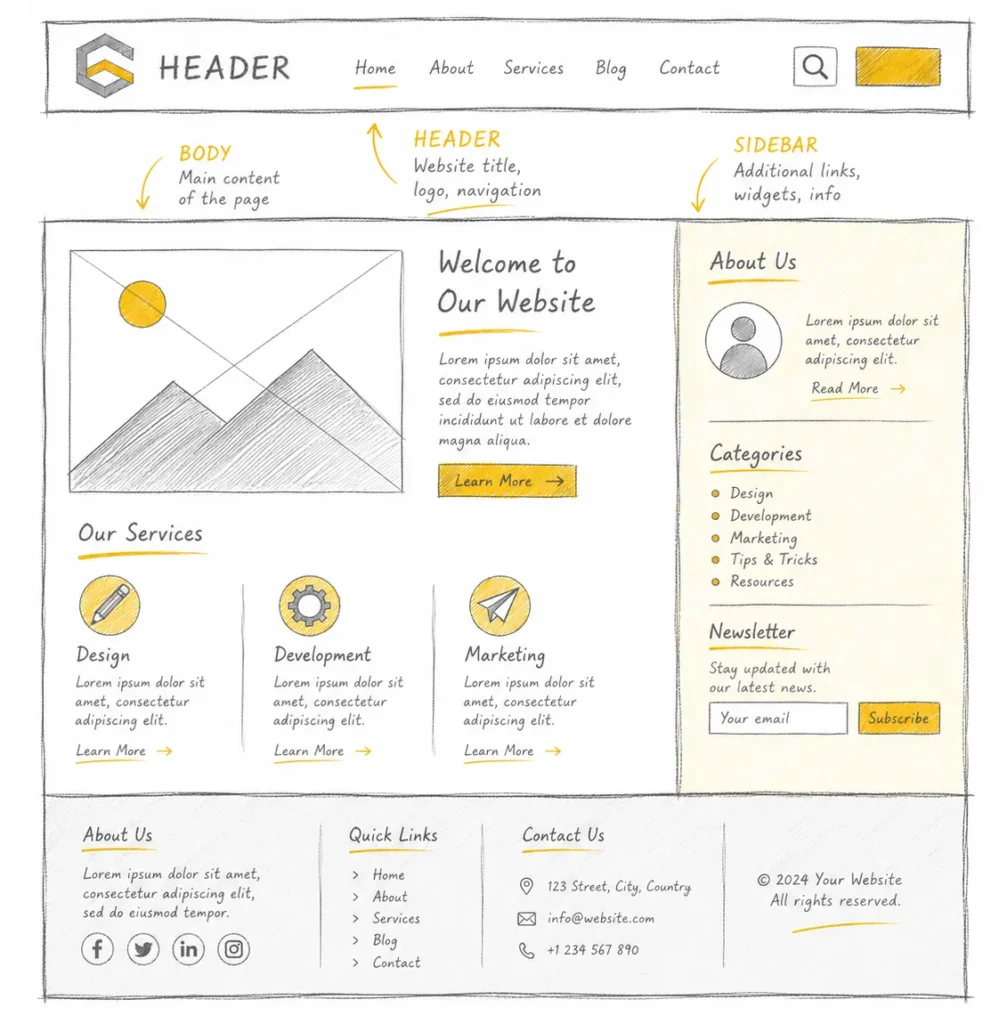
As a good practice, the basic layout structure should be followed while designing a website page. A simple and balanced layout enhances a website’s visual appearance and visitors’ experience.
Images Format and Size
Images are an important design element for the website’s overall look and make text content more interesting. However, excessive use of images can affect the website speed and performance.
When using images for a website, they should be properly optimized, resized, and compressed. Preferably, use web image formats, specifically designed for websites such as WEBP, AVIF, PNG, JPEG, and SVG. These image formats provide compressed and optimized images without compromising quality.
Images and illustrations help to explain an idea or concept effectively, but they should be relevant and used in balance. Unnecessary use of images makes a website design too busy and compromises speed and performance.
Website Optimization for Speed
Search engines love fast-loading websites and increase traffic and visitor retention time. To achieve a fast-loading website, it must be written with clean and efficient code, and all good coding practices and standards should be followed. Websites with bad or broken code consume more resources and result in slow loading speeds.
Optimized Images
Another factor that adversely affects a website’s size and performance is the use of non-optimized images and other assets. It is important to use images with proper compression and format, and use only web image formats such as WEBP, AVIF, PNG, and JPEG.
Use a Content Delivery Network (CDN)
Instead of hosting all resources locally, it is recommended to use a content delivery network (CDN) for other assets, including icons, fonts, videos, and animations. If the website is using any CSS framework or JavaScript library, it should preferably be hosted by a content delivery network.
Minimized CSS and JavaScript
Preferably, use compressed and minimized versions of CSS and JavaScript files, as minimized CSS and JavaScript files are more efficient and executed by the browser and server more quickly.
Choose the Right Hosting Plan
Website speed also depends on server speed and hosting type. Hosting companies offer various hosting plans according to website requirements and clients’ budgets. It is important to choose a suitable hosting plan for a website according to its size and usage.
The ultimate goal should be to keep a website as small as possible, so it consumes optimal online resources.
Responsive Website
In today’s digital age, a website’s success depends upon how well it appears and performs on different screen sizes and devices. A responsive website design is equally effective and functional for all screen sizes and devices.
To achieve a mobile-friendly website, multiple page layouts are designed, most commonly a desktop layout, tablet layout, and mobile layout. Content and sections are arranged differently according to the screen size and the target device’s operating system.
Generally, CSS queries and a grid system are used to activate these layouts on different devices. For mobile devices, a single-column layout is generally preferred, with all content sections stacked vertically. On desktop, there is plenty of space available for a multi-column layout.
Search Engine Optimization
Though search engine optimization (SEO) is a comprehensive topic and taken as a separate subject. A website designer must be familiar with the minimum SEO requirements and terminology.
Some basic SEO related things that a designer should be familiar with:
Frequently Asked Questions (FAQ)
Summary
Website design is the process of creating a website’s layout, structure, colors, and typography to create a website’s visual appearance and functionality. Multiple factors need to be considered to achieve an attractive as well as efficient website design.
Writing website code is a complex process that requires extensive design and programming skills. Fortunately, some alternative methods and platforms make web development an easy task even for non-coders and beginners. However, a basic understanding of website design and development and the tools and technologies used in this process is essential to get started.
Starting with choosing a relevant domain name, planning a site structure and layout, using a suitable color palette and typography, every step needs to be considered to create a fully optimized website with high performance, excellent user experience, and search engine visibility.